How to Add Google Real-Time Search to Your Bookmarks

11 Comments 12.19.09

Here’s a great little bookmarklet created by Steve Rubel but posted on his Posterous blog in HTML instead of as a draggable link. That’s fine if you’re using a browser with decent bookmark support, but for some reason Chrome, otherwise the best browser around, is terrible about bookmarks. Laughably terrible, maddeningly terrible. It would make my laugh if it didn’t make me so mad. Anyway, here’s a link you should be able to drag up to your frustrating little Chrome bookmark toolbar, or to any browser’s bookmark bar, for real time Google search.

Click and drag this little puppy right here —> Real-time search

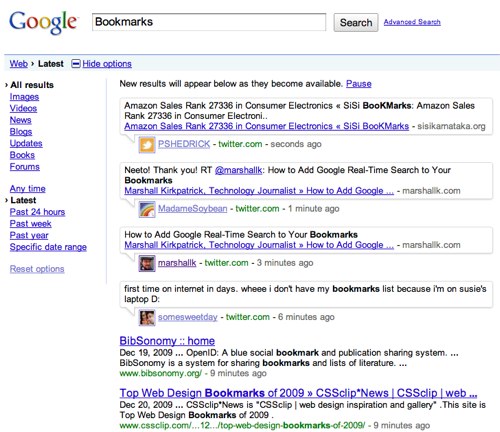
Highlight a word or phrase on any page and then click that button, or just click it freestyle and enter a query. Then you’ll see the freshest search results on the internet, per Google, including new web pages, Twitter messages and sometime soon posts from Identica, Facebook and more.

You know what I’m going to do? I’m going to delete all my bookmarks from Chrome, go set them up in the order I want them in Firefox and re-import them. How silly.

Interested in leveraging the real-time web for your business? Check out the research report I just spent the last 3 months writing on the topic.
bookmarkspic


I want to make sure you know about NTEN - the Nonprofit Technology Network.

NTEN helps nonprofits learn to use the web effectively.

11 Comments so far
Leave a comment

Nice. Cheers.

it’s great! can you make one that opens a new tab, though? javascript neophyte here.

It is just really messed up that in 2009 bookmark management & syncing isn’t just a no-brainier and completely bug free. Google’s on their a-game everywhere but here, ironically.

You have browser bookmarks? I stopped using those, short of bookmarking cloud services, when I created a delicious account.

[...] How to Add Google Real-Time Search to Your Bookmarks [...]

[...] How to Add Google Real-Time Search to Your Bookmarks [...]

It is not workable for IE 7.

The bookmarklet works great on Safari, but would not add to Chrome on a Mac, unless I’m doing something dumb?

[...] and I have no downloads. Hopefully this will change soon. I came up with this idea after finding Marshall Kirkpatrick’s post about Steve Rubel’s bookmarklet. While this add-on was inspired by the [...]

I took this idea, and created a search plugin for Firefox. My blog post can be found here: http://bundyxc.com/?p=235

You’ll find a link to your blog in my post. Props on the bookmarklet.


Leave a comment
Line and paragraph breaks automatic, e-mail address never displayed.

(required)

(required)